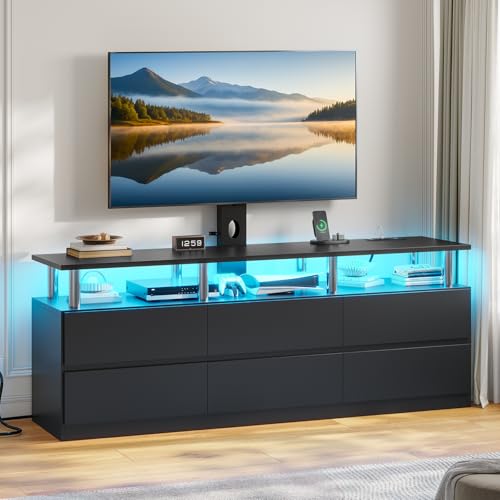
Dresser With Built-In TV Mount: Complete Buying Guide
One piece of furniture, two essential functions. Learn how a media dresser combines bedroom storage with a secure television setup — and how to choose the right one for your space.
Why a dresser with a built-in TV mount makes sense: In many bedrooms, floor space is limited and furniture needs to earn its place twice over. A media dresser solves that problem by pairing generous clothing storage with a stable, reinforced surface for a television. Instead of buying a separate TV stand and dresser, you get a single footprint that serves both purposes — cleaner layouts, fewer cables, and a more cohesive look.
What Is a Dresser With a Built-In TV Mount?
A dresser with a built-in TV mount is a storage piece engineered with television placement in mind. Unlike a standard chest of drawers, it typically includes one or more of the following design features:
- Reinforced top panel — thicker or braced to distribute the concentrated weight of a TV and its stand.
- Integrated mounting bracket — a factory-installed plate or rail, sometimes VESA-compatible, for attaching a wall-style mount directly to the furniture.
- Cable management — pre-drilled routing holes, back-panel cutouts, or channels that keep power and HDMI cables tidy.
- Wider, deeper footprint — extra depth and a lower center of gravity reduce tipping risk when a screen sits on top.
- Ventilation gaps — spacing behind the top surface to help electronics dissipate heat.
If you are still weighing whether a media dresser or a dedicated TV stand suits your room better, our comparison of a dresser and TV stand combo walks through the trade-offs. For buyers who only need the mount and not the built-in bracket, the broader guide to a dresser with a TV mount covers add-on solutions.
Built-In Mount vs. Freestanding TV on Top
There are two common ways to put a television on a dresser, and they are not equal in safety or convenience.
Freestanding TV on the Dresser Top
The TV rests on its own base directly on the dresser surface. This is the simplest setup and works well for smaller screens. However, it consumes top-surface area you might otherwise use for decor, and a standard dresser top may not be rated for the load.
Built-In or Bracket-Mounted TV
A built-in mount or a bracket fixed to a reinforced dresser keeps the TV stable and frees up surface space underneath. It also allows the screen to sit at a more comfortable viewing height and reduces the chance of the TV being knocked over. The trade-off is that installation is more involved and the dresser must be explicitly rated for mounting.
Key Features to Evaluate Before You Buy
1. Weight Rating and Construction
Check the manufacturer's stated load capacity for the top surface and any built-in mount. Solid wood and engineered-wood frames with reinforced joinery hold up better than thin particleboard. If you are comparing materials, our overview of solid wood dressers that need no assembly explains why construction quality matters for load-bearing furniture.
2. Dimensions and TV Sizing
Measure the dresser's top width and depth, then compare them with your TV's width and stand footprint. A useful rule: the TV should not overhang the dresser edges, and the base or mount should sit fully within the surface. Our guides to dressers under 50 inches wide and dressers for small spaces help narrow the field for compact bedrooms.
3. Cable Management
Look for pre-drilled pass-through holes or a removable back panel. Without them, cables drape awkwardly and collect dust. Higher-tier models often include a rear channel that routes wires down to floor level.
4. Drawer Configuration
A media dresser still needs to work as a dresser. Consider whether you prefer many shallow drawers for folded tops or a mix of deep and shallow drawers for bulkier items. Our guide to a dresser with different-size drawers explains how mixed configurations improve organization.
5. Style and Finish
Media dressers come in the same style families as traditional dressers. If you want the piece to blend with a specific interior, browse our dresser style guide or the full dresser styles collection before committing.
Tier Comparison: What Each Level Offers
Because media dressers vary widely in build and features, it helps to think in terms of market tiers rather than specific figures. The table below summarizes what you can generally expect at each level.
| Tier | Typical Construction | TV Support | Best For |
|---|---|---|---|
| Entry-level | Engineered wood with laminate finish; basic hardware | Smaller screens on a freestanding base; limited or no built-in bracket | Guest rooms, first apartments, secondary bedrooms |
| Mid-range | Engineered wood with reinforced top; some solid-wood elements | Mid-size screens; pre-drilled cable holes; optional bracket mounting | Primary bedrooms with moderate storage needs |
| Premium | Solid wood or high-grade engineered core; heavy-duty drawer slides | Larger screens; dedicated mounting plate or VESA-compatible bracket | Main bedrooms, long-term furniture investment |
| Luxury / flagship | Hardwood construction, premium finishes, commercial-grade joinery | Full-size screens; integrated mount with concealed cable channels | Design-led interiors and high-spec media setups |
Within each tier, a well-specified model is a solid choice for its class — the difference between levels is usually in joinery, drawer glide smoothness, and how thoroughly cable management is engineered.
How to Choose the Right Media Dresser for Your Bedroom
- Measure your TV and your wall. Note the TV's width, height with stand, and viewing distance from the bed. The dresser should sit at a height that keeps the screen roughly at eye level when you are seated or reclined.
- Confirm the weight rating. Match your TV's weight (plus the stand or bracket) against the dresser's stated capacity, with some margin to spare.
- Decide on mount type. A freestanding TV is simplest; a built-in or bracket mount is more stable and frees surface space. Verify the dresser explicitly supports mounting before drilling anything.
- Plan the cable route. Identify where the nearest outlet is and whether the dresser's cable management aligns with it. A short extension cord or cable sleeve can bridge small gaps.
- Check drawer access. Make sure the TV does not block the top drawers and that the dresser's depth leaves room for the drawers to open fully.
- Match the room's style. A media dresser is a focal point; choose a finish that ties into the bed frame and nightstands. If you want a coordinated set, look at dressers with matching nightstands.
Placement and Setup Tips
- Anchor to the wall. Use the included anti-tip kit or a furniture strap rated for the dresser's loaded weight.
- Keep ventilation clear. Leave a few inches behind the TV and around the top surface so electronics do not overheat.
- Hide the cables. Route power and HDMI cords through the dresser's pass-through holes and secure them with clips or a sleeve.
- Balance the top surface. Keep heavy items toward the center and avoid stacking decor on one side, which can destabilize the piece.
- Leave drawer clearance. Confirm the TV's position does not interfere with the top drawers opening.
If you are also planning the rest of the room, our dresser versus nightstand comparison helps you decide what each piece should hold so the media dresser does not become overloaded.
Frequently Asked Questions
What is a dresser with a built-in TV mount?
It is a bedroom storage piece that combines drawers for clothing with a reinforced top or integrated bracket designed to hold a television securely. It merges the function of a media console with the storage capacity of a traditional dresser.
Can any dresser support a TV?
Not necessarily. A standard dresser is built to hold folded clothing, not the concentrated weight of a television. A media dresser typically features a reinforced top panel, a wider footprint, and sometimes a factory-installed mounting bracket to distribute weight safely.
How much weight can a TV dresser hold?
Capacity varies by construction. Entry-level media dressers generally support smaller screens, while mid-range and premium models with reinforced frames can handle larger televisions. Always check the manufacturer's stated weight rating for both the top surface and any built-in mount.
Do dressers with TV mounts have cable management?
Higher-tier models often include pre-drilled cable routing holes, back-panel cutouts, or channeling behind the drawers. Entry-level options may lack these features, so verify before purchasing if a clean wire setup matters to you.
What size TV fits on a dresser?
As a general rule, the TV's width should not exceed the dresser's top width, and the stand or mount footprint should sit fully within the surface. Measure both the dresser top and the TV base, and leave clearance on each side for balance and ventilation.
Ready to Compare Options?
Review the recommended media dressers below, compare their construction and features, and choose the one that fits your bedroom layout.